1
Upload a diagram screenshot
Start with a screenshot from a document, ticket, slide deck, web page, product spec, or PDF page.
Upload a diagram screenshot from docs, tickets, slides, websites, or product specs. ChatFlowchart reconstructs the visible structure as an editable Draw.io-compatible draft.
Supported inputs
変換前と変換後
A PNG, screenshot, or PDF page in Draw.io is still just pixels. ChatFlowchart rebuilds the visible structure as editable boxes, labels, and connectors you can export to Draw.io.
Before
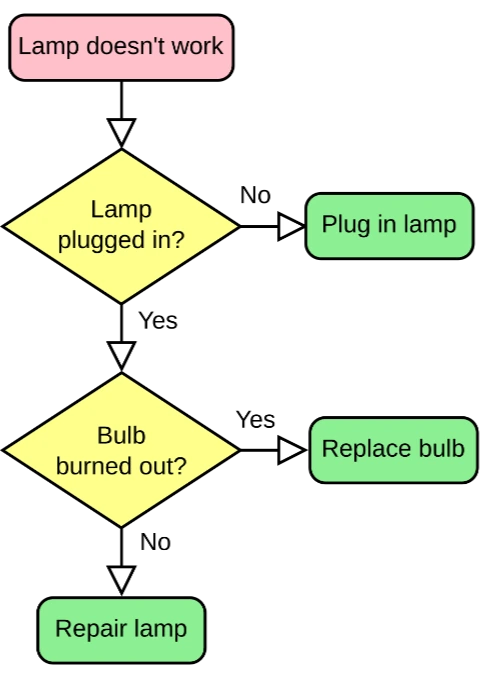
Locked pixels, labels cannot be edited
After
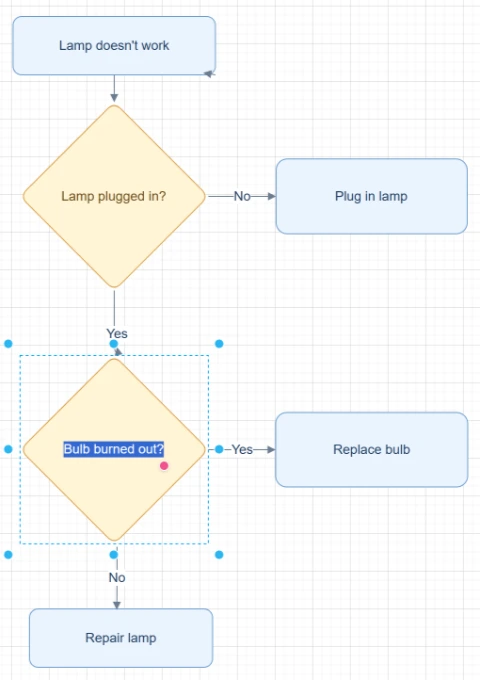
Editable boxes, labels, and connectors
Best for clear diagrams with readable labels and visible arrows. Review dense layouts before export.
Convert to Draw.ioStart with the source file, let AI rebuild the visible structure, then review the editable result on canvas.
Start with a screenshot from a document, ticket, slide deck, web page, product spec, or PDF page.
ChatFlowchart detects readable labels, shapes, arrows, connectors, and layout direction from the screenshot.
Review the reconstructed draft in Modern Style, clean up labels or connectors, and export through the Draw.io-compatible path when needed.
Editable result
ChatFlowchart rebuilds the visible diagram as editable diagram objects, so the output can be reviewed and refined instead of staying locked inside a flat image.
Review and edit the visible text labels after the diagram is rebuilt.
Move, resize, add, or remove process boxes, decision nodes, and other diagram elements.
Reconnect arrows, adjust flow direction, and fix unclear branches when needed.
Clean up spacing, alignment, grouping, and reading order on the editable canvas.
Apply sketch or modern styling before exporting the final diagram.
活用シーン
各変換ページは出力目的ごとに分かれているため、必要な形式やワークフローからすぐに始められます。
Reconstruct process diagrams copied from Confluence, Notion, wikis, or exported documentation.
Convert workflow screenshots attached to Jira, Linear, GitHub issues, or support tickets into editable drafts.
Create editable diagram drafts from presentation screenshots when the original source file is missing.
Capture a diagram from a web page or help center article and rebuild it for maintenance.
Turn diagram screenshots from product requirements, design specs, or process notes into diagrams your team can edit.
詳細
Screenshot to Draw.io conversion helps when a diagram only exists inside a document, ticket, slide deck, web page, or product spec screenshot.
ChatFlowchart reads the visible screenshot and reconstructs the diagram as editable text, shapes, arrows, connectors, and layout on the canvas.
Inserting a screenshot into Draw.io keeps the full diagram as one flat image. You can move or resize the screenshot, but the boxes, labels, and arrows inside it remain locked.
ChatFlowchart is designed for a different workflow: it reconstructs the visible diagram as editable objects so you can update the flow instead of tracing it manually.
The best screenshots show one diagram at a time with readable text, clear arrowheads, visible connector lines, and enough contrast between shapes and the background.
Screenshots with tiny labels, cropped branches, blurred text, or low contrast can still produce a useful draft, but they usually need manual review and cleanup.
Results and quality
Images, screenshots, whiteboard photos, and PDF uploads are supported. Text-based PDFs can be extracted directly, while scanned PDFs work best when the diagram, labels, and arrows are clearly visible.
Export availability follows the current ChatFlowchart canvas export options.
Continue from the converted diagram without rebuilding the file.
Continue refining the rebuilt diagram with manual edits or AI chat.
Export the finished diagram as PNG, SVG, PDF, Draw.io, Mermaid, or a shareable link when available.
Ask ChatFlowchart to rename labels, adjust steps, clean up layout, or correct arrows.
Mark whether the result looks good or needs cleanup so weak inputs are easier to diagnose.
FAQ
Upload a diagram screenshot and turn the visible flow into an editable Draw.io-compatible draft you can review, refine, and export.